The complete GetRankWP guide
Every feature, how it decides, what it costs, and what it never does without your approval.
Screenshots below are real, taken from a live site running on this panel.
1. What this panel actually is
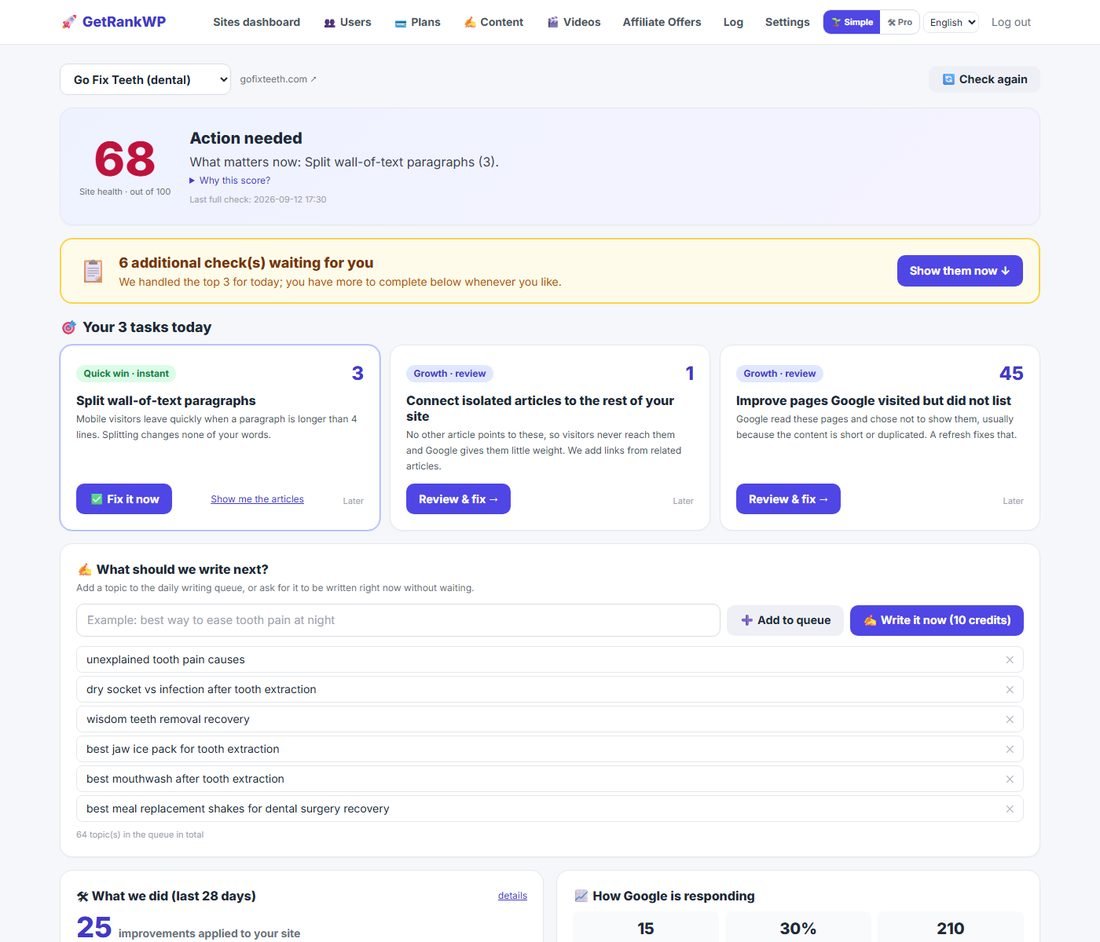
Most SEO tools are microscopes: they show you what is wrong and leave the repair to you. GetRankWP is a microscope plus a pair of hands. It connects to your WordPress site over the official REST API, reads every article, compares them against your real Google Search Console and Analytics data, then either fixes what is safely fixable on its own or hands you a short list of decisions with the evidence attached.
It also writes. New articles, refreshed old ones, interactive calculators, Pinterest images, short videos — all published into the same site it is diagnosing, so writing and repair share one brain instead of fighting each other.
2. Two modes: Simple and Pro
The same account has two skins, switchable from the header at any time. Your choice is remembered per user.
| Simple | Pro | |
|---|---|---|
| Who it is for | Site owners who do not know SEO | People who want every lever |
| Screen | One page, no tabs | 12 tabs per site |
| Metrics shown | 6 key ones | All 19, charted |
| Risky tools | Hidden, or two-step with preview | All available |
| Vocabulary | Plain language only | Technical terms allowed |
3. Getting started in about ten minutes
- Connect WordPress. Either install our small plugin and paste the 6-character code from your dashboard, or enter the site URL, your WordPress username and an Application Password (WordPress → Users → Profile → Application Passwords). We never ask for, receive or store your real WordPress password, and you can revoke the Application Password from that same screen at any time.
- Connect Google. One click, pick the Google account that owns the site, press Allow. We read Search Console and Analytics; we never write anything to your Google account, and we automatically match the right property and GA4 stream to the right site.
- The first quick scan runs immediately (about a minute). The full audit runs in the background and appears a few minutes later.
- Work the three tasks on screen. Anything labelled instant is safe and reversible. Anything labelled decision asks you to confirm what will happen first.
4. The health score, and exactly how it is calculated
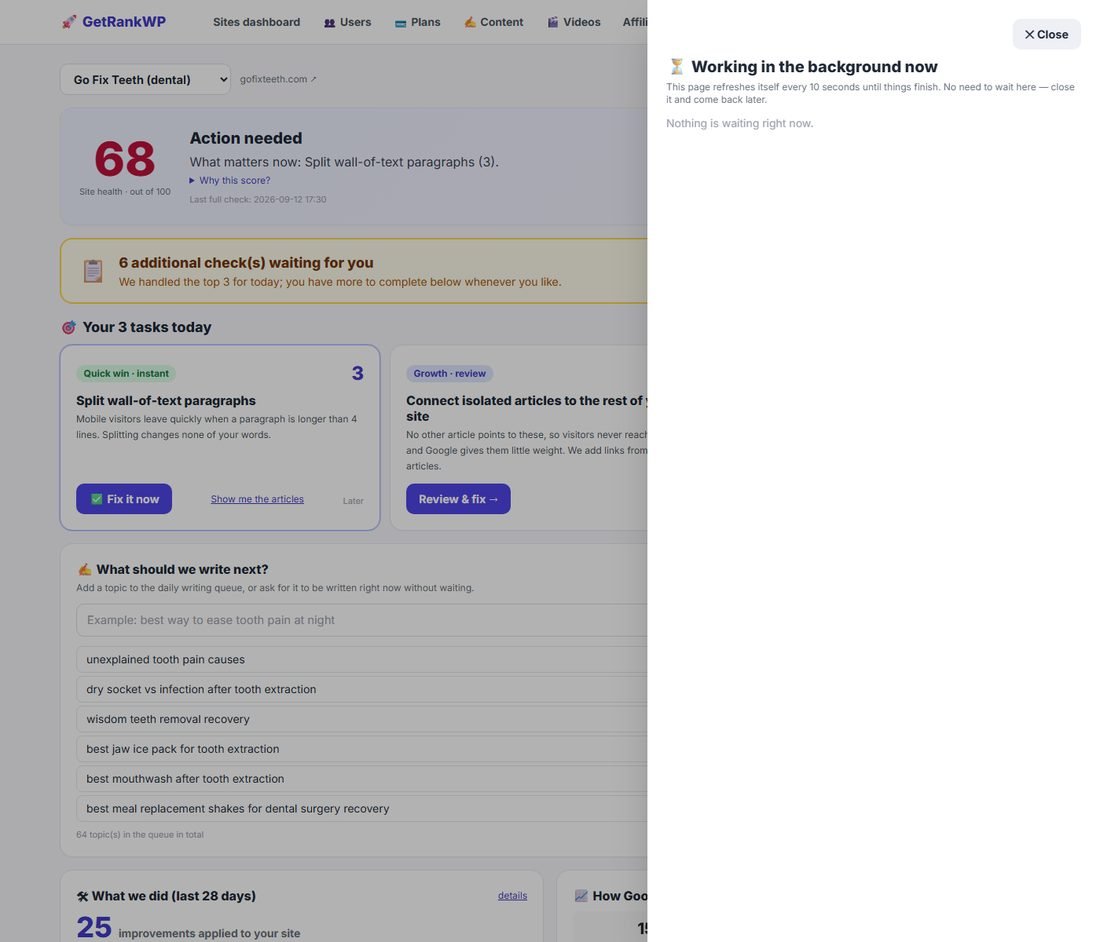
One number from 0 to 100, plus the reason for every point deducted. It is not a vanity metric: each deduction maps to a specific, fixable problem, and clicking the reason takes you to the affected articles.
| What is checked | Maximum deduction |
|---|---|
| Affiliate articles with no legal disclosure | 25 |
| Thin articles (under 400 words) | 20 |
| Images with no alt text | 10 |
| Articles with no internal links | 10 |
| Paragraphs longer than 55 words | 8 |
| Google Search Console not connected | 12 |
| Pages Google refuses to index | up to 15 |
| Articles losing rankings and not yet refreshed | up to 10 |
| Articles competing with each other for one query | up to 8 |
| Abandoned zero-traffic pages | up to 6 |
| Orphaned pages with no visitors | up to 5 |
Above 90 is excellent, 70 to 89 is good, below 70 needs work. The score is recomputed on every full check and stored so the dashboard can show it without hitting your site again.
5. The task engine: fourteen task types
Everything the panel finds becomes a task with a fixed priority order — legal risk first, then free instant wins, then growth, then structural decisions, then clean-up. Each task carries a badge telling you what it will cost you in effort and risk before you open it.
| Task | What it means | Action type |
|---|---|---|
| Connect Google | We are working blind without it | Setup |
| Add the required earnings notice | Amazon links with no disclosure — account risk | Instant, free |
| Describe blank images | Images with no alt text | Instant, free |
| Split wall-of-text paragraphs | Paragraphs over 55 words | Instant, free |
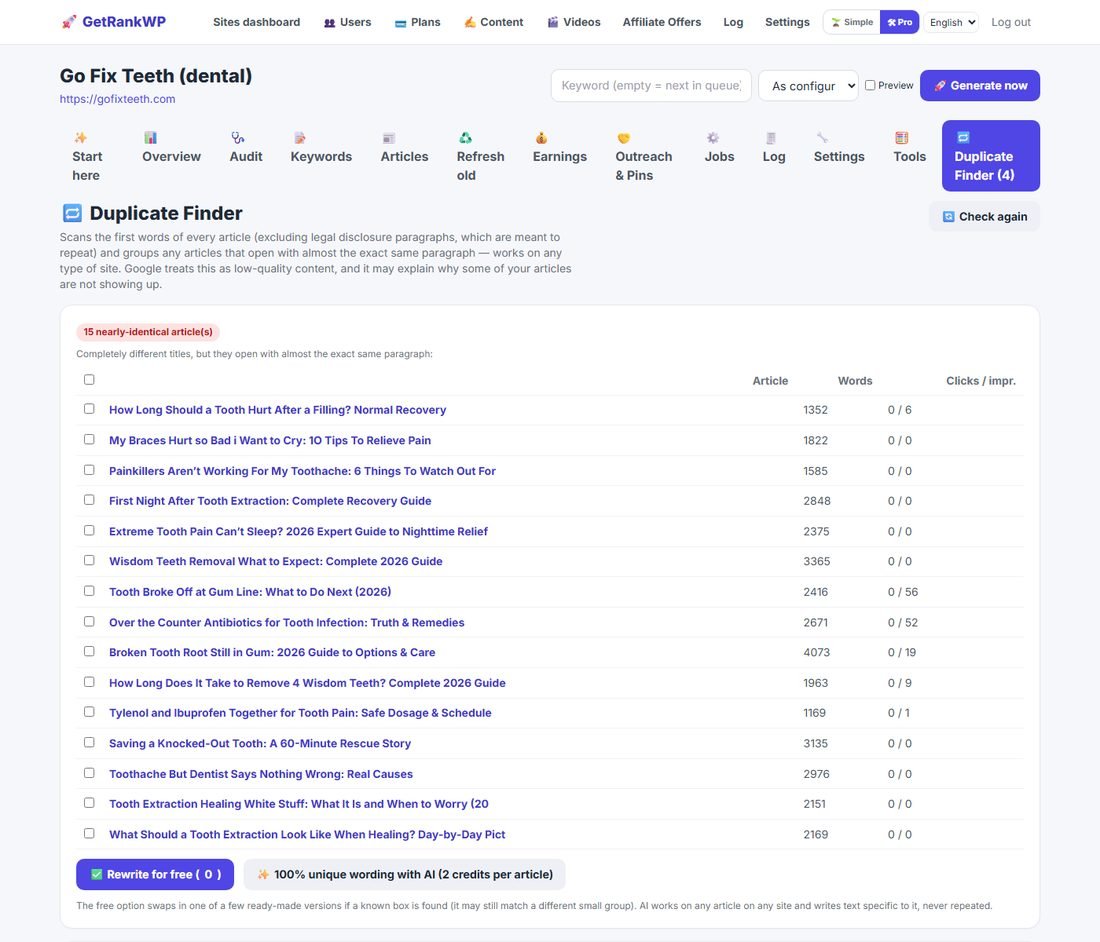
| Rewrite duplicate opening paragraphs | Different articles opening with the same text | Instant free, or AI |
| Push near-page-1 articles onto page 1 | Ranking 8–30 with real impressions | Review then refresh |
| Connect isolated articles | No other article links to them | Review then auto-link |
| Combine overlapping articles | Two of your pages fight for one query | Two-step decision |
| Improve pages Google visited but did not list | Crawled – currently not indexed | Review then refresh |
| Safely remove abandoned pages | Zero traffic for 6+ months, nothing links to them | Two-step decision |
| Introduce Google to undiscovered pages | URL unknown to Google | Review then internal links |
| Expand very short articles | Under 400 words | Review then refresh |
| Fix links to dead websites | External citations returning 404 | Review then refresh |
| Review pages with no visitors | Zero traffic but internally linked | Manual only, on purpose |
Any task can be postponed for a week with one click; postponed tasks move to the bottom of the full checklist rather than disappearing.
6. The full diagnosis: every check it runs
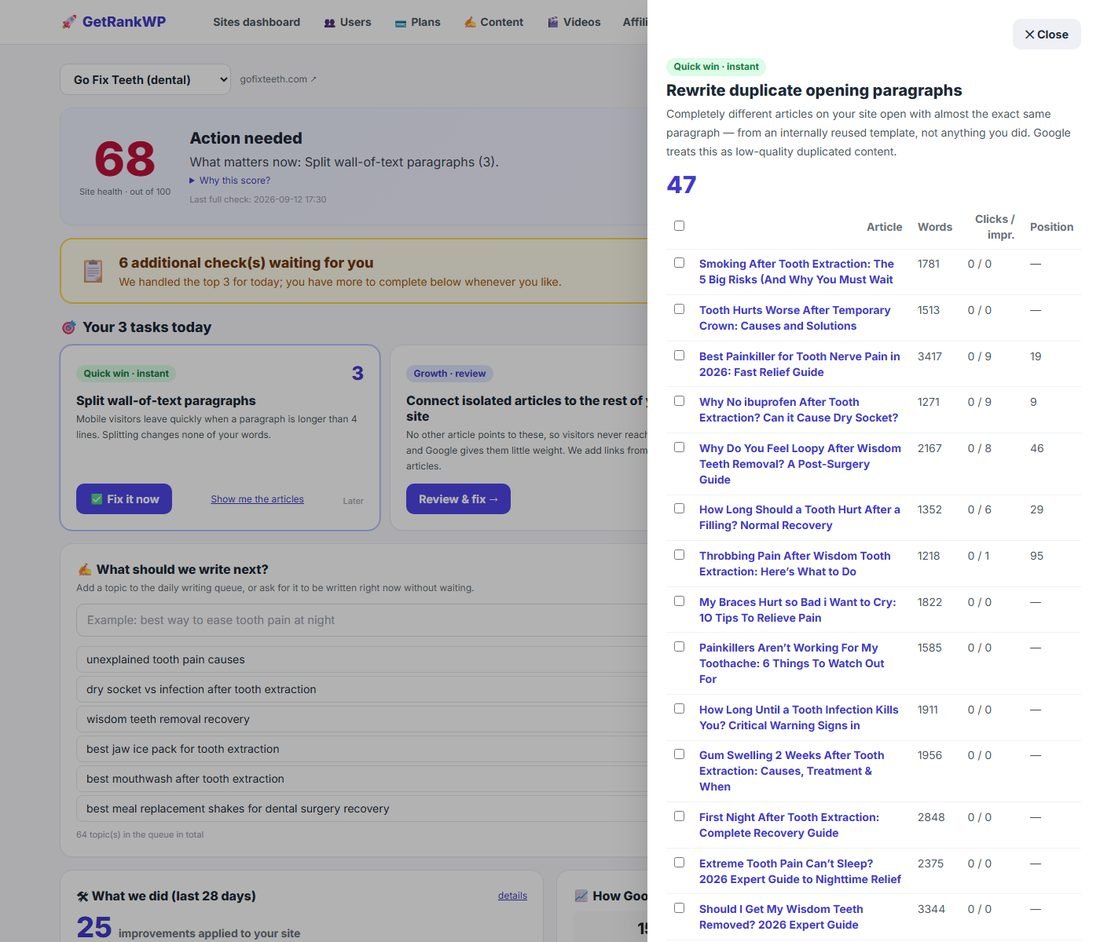
The full check reads every published article through the WordPress REST API and cross-references it with Search Console, Analytics, and live HTTP checks of the links inside it.
- Broken AI output — articles containing leftover model chatter such as “as an AI language model”, restorable from a clean earlier revision.
- Thin content — under 400 words.
- Zero traffic — no impressions for 180+ days and almost no Analytics views.
- No featured image.
- No money links — an affiliate site article with no product or offer in it.
- Isolated articles — not a single link from anywhere else on your site.
- CPA links that can damage trust.
- Weak click-through — shows often, gets clicked rarely, meaning the title is not pulling its weight.
- Page-1 opportunities — position 8 to 30 with at least 100 impressions.
- Amazon compliance — fixed prices stated near affiliate links (against Amazon's terms), disclosure missing or not at the top, and product boxes placed above the content on health topics.
- Cannibalisation — two of your pages appearing for the same Search Console query, with the weaker one flagged and the stronger one named as the merge target.
- Dead Amazon products — ASINs that no longer exist (requires a ScraperAPI key).
- Dead citations — external authority links returning 404 or 410.
- Duplicate openings — articles starting with an almost identical paragraph.
7. Duplicate Finder
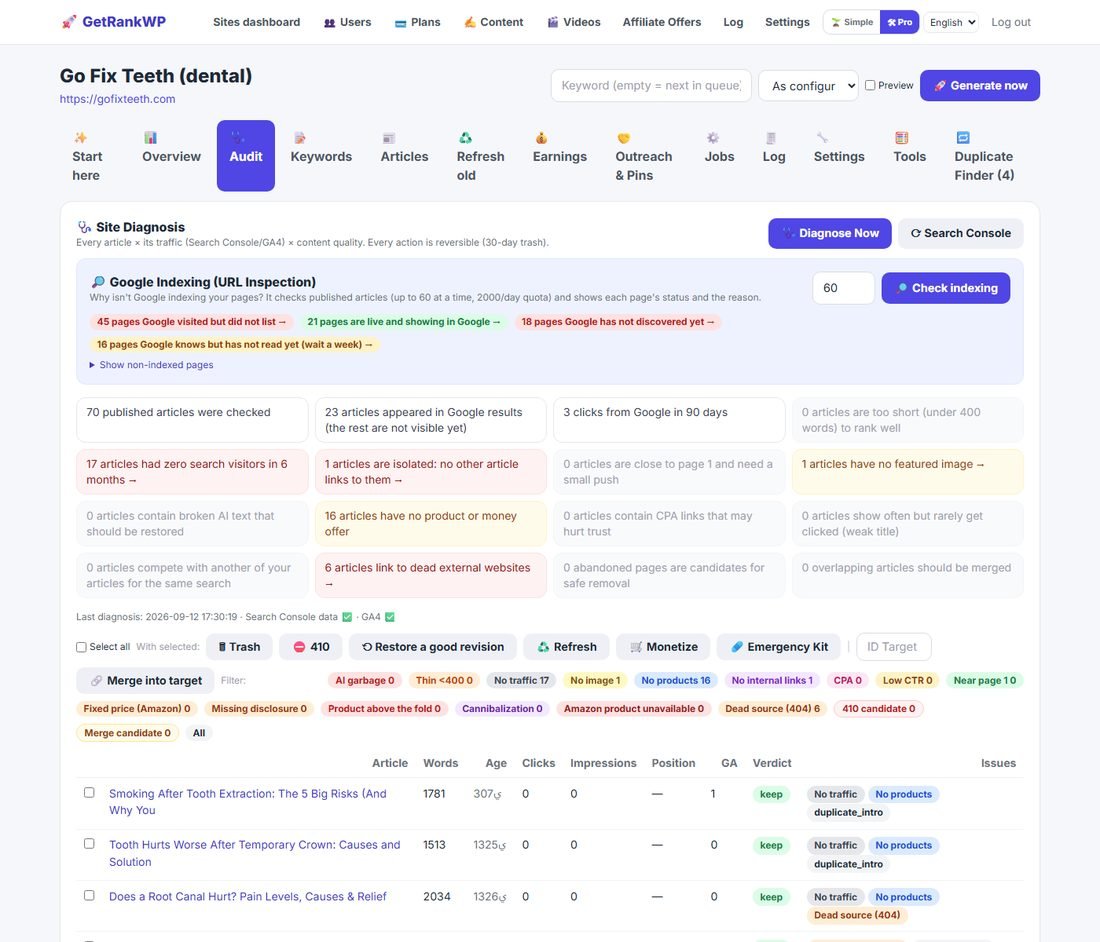
A dedicated tool, and the one we are least aware of any competitor shipping. It fingerprints the first 35 meaningful words of every article (ignoring the legal disclosure, which is supposed to repeat) and groups any articles that open with almost the same text.
Why it matters: duplicated openings across a topic cluster are read by Google as templated, low-value content, and they are invisible to every ranking-based duplicate check, because the affected pages usually have no rankings to compare in the first place. We found this on our own dental test site: 47 of 70 articles opened with a byte-identical paragraph.
| Option | Cost | What it does |
|---|---|---|
| Rewrite for free | Free, instant | Swaps a known reused block for a different ready-made version |
| Make it fully unique with AI | 2 credits per article | Writes a fresh opening tied to that one article, works on any site in any niche |
8. The AI advisor
On every task that needs human judgement — merging, removing, refreshing, orphaned pages — there is a button that asks an AI advisor what it would do in your place. It reads the actual affected articles with their traffic and ranking data and answers in plain language, in your interface language, naming specific articles.
It costs 3 credits and it is advisory only. It never executes anything. A real answer it produced on our dental site: keep the page Google is already testing near the top, update the article with an outdated year in its title, and merge the dozen overlapping extraction-pain guides into your strongest two or three.
9. How an article is actually written
This is the part most tools keep vague. Here is the real sequence, every time.
- Pick the topic — from your queue, or one you typed, or one the system proposes from Search Console opportunities.
- Cannibalisation guard — if you already have an article covering that keyword, it refuses to write a competitor and tells you which article already owns it.
- Cluster awareness — if the topic belongs to a planned cluster, the pillar and its siblings are passed in so the new article links into the right place automatically.
- Draft with your chosen model.
- NeuronWriter scoring, if you connected it — the draft is scored, and revised up to your configured number of attempts until it beats your minimum score.
- Products — Amazon cards or your own offers are injected where they fit, never above the content on health topics.
- The quality gate (below).
- Link verification — every external citation is fetched; dead ones are unwrapped so the text survives but the broken link does not.
- Schema — FAQ markup, an author box, and MedicalWebPage markup on health content with the author declared as a researcher, never as a clinician.
- Featured image from Pexels, publish or save as draft per your setting, then IndexNow ping so Bing and Yandex see it immediately.
10. The quality gate
Every article, new or refreshed, passes through automated checks before it can reach your site. This is the machinery that stops the panel from being just another bulk AI publisher.
- Dosage trap — any specific medication dose (“take 400 mg”) is rewritten into label guidance. Health content should never invent dosages.
- Meta-talk ban — filler like “in today's fast-paced world” and “as mentioned earlier” is stripped.
- Sentence de-duplication — near-identical sentences inside one article (80% word overlap) are removed.
- Readability — Flesch-Kincaid grade is measured, and anything above grade 10 is rewritten shorter and simpler.
- Answer-first — the opening must actually answer the title's question. A how-long title must contain a time, a yes/no title must contain a verdict. If it does not, it is rewritten.
- Long paragraph splitting at 55 words, on sentence boundaries, never mid-thought.
- Alt text repair, including replacing junk alt text such as “pexels-photo-12345”.
- Timeline conflict detection — if the same article says “3 days” in one place and “a week” in another about the same thing, the contradiction is found and reconciled.
11. Topic clusters
Single keywords rarely win any more; Google ranks topical authority. Give the panel a theme and it plans one comprehensive pillar guide plus 8 to 12 supporting articles, queues them in the right order, and wires the internal links both ways automatically: every supporting article links up to the pillar, and the pillar collects them all.
If you already have an article strong enough to be the pillar, it is adopted rather than duplicated.
12. Refreshing old articles
Articles decay. With Google connected, the panel compares each page's clicks and average position against its own baseline and flags real decay — for customer sites the thresholds are deliberately strict (at least 150 impressions or 15 clicks in the baseline, and a drop of 4+ positions or 30% of clicks) so you are never sent chasing noise.
A refresh rewrites the weak parts, updates the title and internal links, saves a full copy of the previous version first, and refuses to finish unless the new NeuronWriter score beats the old one.
13. Google index coverage
Using the official URL Inspection API, the panel asks Google directly about each published page and stores the verdict: indexed, crawled but not indexed, discovered but not crawled, or unknown to Google. Each state is translated into a sentence and a specific next step, because the right response to each is different.
| Google says | What it really means | What to do |
|---|---|---|
| Submitted and indexed | Live in search | Nothing |
| Crawled – currently not indexed | Google read it and declined | Improve or merge it |
| Discovered – not indexed | Queued, not read yet | Wait a week |
| URL unknown to Google | Never found at all | Add internal links to it |
14. Nineteen daily metrics
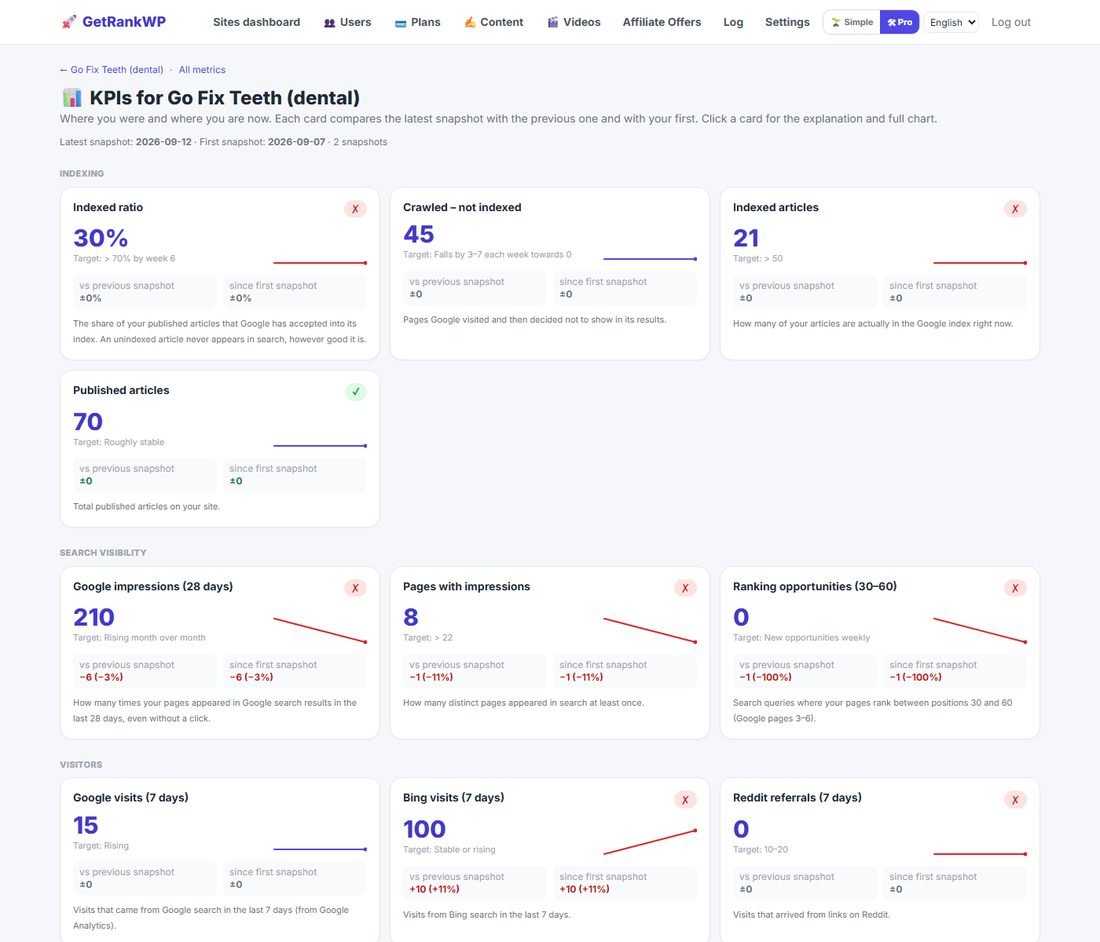
A snapshot is taken every morning after the Google sync. Every metric has its own page explaining what it measures, why it matters, what good looks like, and what to do when it is bad — plus a chart with your target line and the full history.
The metrics cover indexing (indexed ratio, crawled-not-indexed, indexed count, published count), search visibility (impressions, pages with impressions, page-1 opportunities), visitors (Google, Bing, Reddit, Pinterest, average dwell time), interactive tools (views, completions, completion rate), email list (CTA clicks, subscribers) and server health (response time, HTTP status).
15. Click Guard: titles that earn the click
Google can show a page hundreds of times while almost nobody clicks it. The usual reason is a vague title. Click Guard compares every page's click rate with what its position normally earns; a page under half of that becomes the task "Get searchers to click your pages".
- Pick the pages and press "Suggest better titles" (1 credit per page).
- For each page you see the current Google snippet next to three alternatives, each with a different angle. Edit any text, then apply one.
- We change the WordPress title and excerpt. The old ones are kept word for word: undo is one click.
- About a month later we compare a full 28-day window with the new title against the month before and show: improved, worse, or no clear difference.
16. The content calendar
The Calendar tab shows every published article, every topic you pinned to a date, and what autopilot will write on the coming days if you change nothing.
- Drag a topic to any day (on a phone: tap it, then tap the day). A pinned topic is written on its day even if it is not a publishing day.
- Tick your publishing weekdays. Nothing is written on the other days except what you pinned.
- "Fill this month" spreads the highest-priority topics over the open days; "Clear this month" sends them back to the queue.
- Articles per day = 0 keeps the plan but writes nothing: the pause you may want while fixing an existing site.
17. Rank tracker
Every morning we store a Search Console snapshot (28-day window) per query and page. The Rank tracker tab reads that history for the keywords you choose: current position, change versus the snapshot 7 and 28 days earlier, clicks and impressions, a trend line, and the page that ranks.
- Add keywords by hand (one per line) or from the suggestions: your most-shown queries not tracked yet.
- A green arrow means a better (lower) position than before.
- A keyword shows no data until it has actually appeared for your site in Google; we never guess positions from third-party tools.
- Up to 100 keywords per site.
18. Broken internal links
During the full diagnosis we test the links and images inside each article that point to your own site. A target answering 404 or 410 is a broken internal link: readers hit an error page and Google reads it as neglect.
- The task "Fix broken internal links" lists the articles and their broken targets.
- One click: if a live article clearly matches the broken link's slug, the link is pointed to it; otherwise the link is removed and its text kept. Broken images are removed.
- Each fix stores the previous version of the article: undo is one click. Results are cached for 30 days, so a site with many links is covered over a few audits.
19. Search descriptions
The description Google shows under your title comes from the WordPress excerpt when no SEO plugin sets one. Articles with an empty excerpt get the task "Write search descriptions".
- Select up to 20 articles; a description of 130–155 characters is written for each, in the site language, from the article itself and the queries it already shows for (1 credit per article).
- It is saved in the excerpt, which Rank Math and Yoast use as the default description.
- The previous excerpt is kept: undo is one click.
20. Interactive tools
Describe a calculator or quiz in one sentence and the panel designs the questions and result logic, validates them, and publishes a working page on your own site in about a minute. These are what earn links and returning visitors, and they are measured: views, completions, completion rate and email-capture clicks all feed the daily metrics.
Three starter templates are built in: an ROI and cost-savings calculator, a product-matcher quiz, and a time-loss estimator. 15 credits each.
21. Monetisation
Amazon products are resolved through the official Product Advertising API when you have keys, or through a safe fallback search when you do not. Price text is never hardcoded next to an affiliate link, because stating fixed prices violates Amazon's operating agreement. A compliant disclosure is inserted at the top of any article containing affiliate links.
You can also define your own affiliate offers per niche; matching articles receive them automatically. Amazon earnings reports can be imported to see which articles and which products actually pay.
22. Outreach, Pinterest and video
- Reddit — watches the subreddits you choose for threads your content genuinely answers, and drafts an empathetic reply with at most one link. Drafts only; you post.
- Directories and local pages — finds relevant submission targets and prepares the drafts.
- Pinterest — renders 1000×1500 pins from your articles and schedules them through Publer.
- Video — turns an article into a short script, and with the local worker renders narrated video and publishes it to the platforms you choose.
23. The weekly report
Every Monday, an email in plain language and in your language: health score, Google clicks for the last 28 days with the trend, the number of improvements applied, your three tasks for the week as direct links, and an honest note when nothing has moved yet. The same report is always available in My account.
24. Jobs, logs and transparency
Anything slow runs in the background and is fully inspectable. Click any job and you get what it did in plain sentences, the raw result folded underneath, the system messages recorded while it ran, its duration, and a retry button.
The pending-jobs badge in Simple mode opens a live list with a running timer per job, refreshing itself every ten seconds, so a slow job never looks like a frozen one.
25. Safety, undo and what we never do
- Every automatic text fix stores the complete previous HTML and can be reverted with one click from “What we did”.
- Merging and removal are two-step: you pick the surviving article, you tick a box confirming you understand the consequence, and only then does the button activate.
- Removal means the WordPress trash (recoverable for 30 days) plus a 410 signal to Google. We never permanently delete anything.
- Bulk removal is capped at 30 pages per action, with a warning when a batch is a large share of your site.
- Internally linked pages are never proposed for automatic deletion; they get a manual-review task with no bulk button at all.
- Every action is written to an audit log with the user and the site.
26. Credits and plans
Work costs credits, and the price is always shown on the button before you press it.
| Action | Credits |
|---|---|
| New article | 10 |
| Refresh an article | 6 |
| Merge articles | 8 |
| Interactive tool | 15 |
| Cluster plan | 5 |
| Add money links | 3 |
| AI advisor | 3 |
| AI-unique rewrite | 2 per article |
| Full diagnosis / index check / internal links | 1 |
| Google sync, daily metrics | Free |
Your plan adds credits monthly while your subscription is active. If your balance will not cover an action, it does not start and nothing is charged.
27. Privacy and security
- Stored: your site URL, WordPress username, the revocable Application Password you created, and read-only Google tokens if you connected Google.
- Never stored: your real WordPress password, your Google password, your payment card.
- Google access is read-only. We never write to your Google account.
- Every customer's sites, jobs, keywords, credits and Google connections are isolated; requests are checked for ownership on every action, not just in the interface.
- Passwords are hashed, forms are CSRF-protected, and the API has rate limits.